
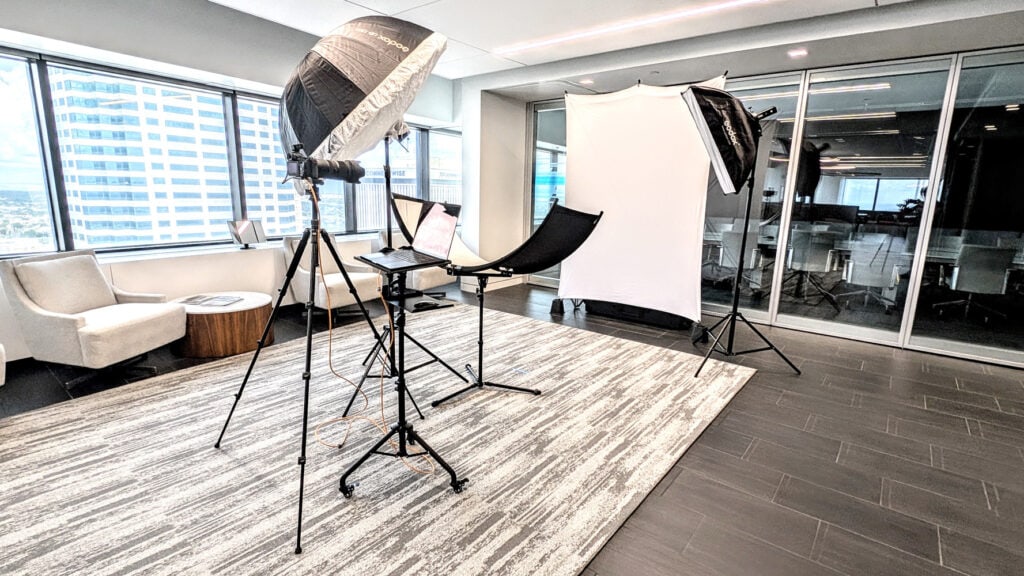
Picture the morning of your company headshot day. The photographer is setting up in the conference room, a few people are nervous about the camera, and someone just remembered a client call is booked for 10:30. This corporate headshot prep guide exists so that morning goes smoothly. Do a little work up front and your team steps away from their desks, gets photographed, and goes right back to work.
I photograph teams on-site across Tampa Bay and nationwide, so I have seen what makes a headshot day easy and what makes it painful. The difference is almost never the camera. It comes down to the room, the schedule, and whether people know what to expect. This corporate headshot prep guide covers all three, for the person organizing the day and for the people being photographed.
The Quick Version: What I Need From Your Office
Here is the short list. Everything else in this corporate headshot prep guide helps you get these right.
| What I need | Why it matters |
|---|---|
| An unobstructed area of about 10 feet by 15 feet | This fits my backdrop, lights, and the distance between camera and subject. Furniture in the frame or in the light path costs time and quality. |
| A quiet space, if you can manage it | People relax when they are not being watched by the whole floor. Relaxed people look like themselves. |
| One working power outlet | That is all I need from your building. I bring the rest of the studio. |
| Strong Wi-Fi | It keeps the day moving and lets me back up images as we shoot without waiting on a connection. |
| One internal point person | Someone who can find a missing employee, answer a question, and keep the schedule honest. |
For most offices, a conference room, a large office, a training room, a quiet corner of an open floor, or a lobby alcove all work. If you are not sure about a space, send me a phone photo with a rough measurement and I will tell you yes or no before the day.
Why a Corporate Headshot Prep Guide Matters More Than the Camera
Most company headshot days that go sideways have the same cause. The room was not ready, nobody knew the schedule, or half the team showed up unsure what to wear and worried about how they would look. None of that is a photography problem. It is a preparation problem, and it is easy to fix.
I bring a complete mobile studio, with strobes that overpower office lighting, so the person photographed at 9:00 AM looks the same as the person photographed at 4:00 PM. That consistency is what makes a team page look like one company. Good preparation protects it.
Your Corporate Headshot Prep Guide Timeline
Three to four weeks out
Pick the date and the room. Walk the space and ask one question: could I stand a person 10 feet from a backdrop here without moving a desk into the hallway? Tell me how many people you expect and whether you want individual headshots, group photos, or both. If you have a brand color or a style you want to match, send me the website or a few examples of images you like.
Two weeks out
Send the schedule and the wardrobe note to your team. I give each person a time slot so nobody waits in line and nobody loses a morning. Group by department or floor when you can, and avoid booking anyone against a standing meeting. Ask people to flag accessibility needs or scheduling conflicts now, not that morning.
One week out
Send a reminder to anyone who has not confirmed. Share the plain-language prep tips below. Confirm that the space will be reserved, empty, and unlocked when I arrive, and that the Wi-Fi works in that room.
The day before
Clear the area. Move chairs, plants, and rolling carts out of the shooting zone. Confirm parking or loading access so I can get my equipment in without hauling it across a campus. Send one last note with the room location and your point person’s cell number.
Headshot day
I arrive early, build the studio, and test the lighting before the first person walks in. Your point person walks employees over a few minutes before their slot. Each person gets coaching on posture and expression, sees the image on the screen as we go, and heads back to work. At 20 to 30 people per hour, that rhythm only works because everyone arrives on time and ready.
How Long Does Each Person Take?
Most people are away from their desk for under 10 minutes. For large teams I can photograph around 20 to 30 people per hour, because the lights are already set and the schedule is tight. If you want more time per person for executives or a more polished look, we slow the pace and I build the schedule around that. Tell me the goal and I will tell you the realistic number for your day.
What Should Employees Wear?
This is the question I get most, so give your team the answer in advance.
Solid colors photograph best. Navy, charcoal, deep blue, burgundy, and forest green work for almost everyone. Avoid busy patterns, small stripes, large logos, and text, because they pull attention from the face and can create distracting texture on camera. Skip bright white as the main color since it can wash out skin tones.
Fit matters more than price. A jacket or top that fits well beats an expensive one that pulls or bunches. Bring a backup option in a different color. If your company wants a uniform look across the whole team, tell me early and we can pick a shared palette so the finished page looks intentional.
Wrinkles show up on camera. Steam or iron the day before, and hang the outfit instead of folding it. Keep jewelry simple and glasses clean. If someone wears glasses all day, they should wear them in the photo, and I will adjust the lighting to reduce glare.
How Should Employees Prepare Personally?
Nothing dramatic. Sleep well the night before, drink water, and eat something. Schedule a haircut at least a week ahead so it settles in. Beard trims and grooming should be done the day before, not the morning of. For makeup, a polished version of your everyday look works best. Bring any touch-up items you rely on, plus a lint roller if you have one.
Spend two minutes thinking about what you want the photo to say. Most people want to look confident and approachable, and that is exactly what I coach toward. You do not need to practice poses. You just need to show up as yourself.
What About the People Who Hate Being Photographed?
Almost every team has a few of them, and it is completely normal. I tell people the same thing every time: you do not need to be a model, and you do not need to know what to do with your hands. I will tell you exactly where to stand, where to look, and what to do with your chin and shoulders.
Seeing the image on the screen as we work helps a lot. People relax the moment they see a result they like, and then the real expression shows up. If your team has nervous employees, give them a slot early in the day or a slot with a friendly coworker nearby. Tell them it takes a few minutes, not an hour.
Common Objections, Answered
“It will disrupt the workday.”
Individual time slots keep disruption small. Each person is gone for under 10 minutes, and nobody is waiting in a hallway. Compare that with sending a team to a studio across town, where travel and parking take a big bite out of each person’s day. On-site is the less disruptive option.
“We do not have the space.”
You need about 10 feet by 15 feet and one outlet. That is a smaller footprint than most people expect, and a conference room, training room, or empty office usually works. If you are unsure, send me a photo and I will help you find a spot.
“Our team is small, and some people are remote or part time.”
This is exactly why I keep a studio in Ybor City in Tampa. Remote employees, part-timers, and anyone who misses the on-site day can come to the studio for the same lighting, backdrop, and style. You can also schedule an on-site day and a studio makeup session together so nobody is left out.
“People leave and new hires arrive all the time.”
This is the biggest reason companies end up with mismatched team pages. A new hire gets a phone photo, a former employee’s photo stays up, and within a year the page looks like five different companies. The fix is simple. I keep the same backdrop, lighting, and framing, so a new hire photographed at my Tampa headshot studio next spring will match the rest of the team photographed in your office today. That consistency holds across multiple offices and states too.
“Can we just use AI headshots or phone selfies?”
You can, and some companies do. The trade-off is trust. Clients, patients, and recruiters notice when photos look generated or inconsistent, and they do not usually say anything. They just trust a little less. A real photograph of a real person, lit well and coached, is still the strongest first impression your team page can give.
“How do we handle a team spread across several cities?”
I travel. I photograph on-site teams nationwide, and I use the same lighting and framing everywhere, so your Raleigh office, your Atlanta office, and your Tampa headquarters look like one company. See my nationwide on-site corporate headshots page for the cities I serve.
What Happens With the Photos Afterward?
Delivery timing and file formats are confirmed in your quote, so you know what to expect before the day. Decide in advance where the images will live, and who on your team will store them. Websites, LinkedIn, email signatures, directories, and press kits each need slightly different crops, and I can deliver for all of them.
The Organizer’s Corporate Headshot Prep Guide Checklist
- Choose the date, the room, and the point person.
- Confirm 10 feet by 15 feet of clear space, one power outlet, and working Wi-Fi.
- Send the schedule and wardrobe note two weeks ahead.
- Remind everyone one week ahead and confirm headcount.
- Clear the room the day before and confirm building access and parking.
- Plan a makeup session for anyone who is out sick, remote, or hired later, at my Tampa studio.
- Decide where the finished images will be used and who stores them.
The Employee’s Corporate Headshot Prep Guide Checklist
- Wear a solid color that fits well, and bring a backup.
- Skip busy patterns, large logos, and bright white.
- Steam your clothes, trim your grooming a day early, and keep jewelry simple.
- Sleep, hydrate, and eat before your slot.
- Arrive on time and leave your phone in your pocket.
- Trust the coaching. You do not need to know how to pose.
Corporate Headshot Prep Guide FAQs
How big does the space need to be for on-site corporate headshots?
I need an unobstructed area of about 10 feet by 15 feet. Quiet is preferred, plus one power outlet and strong Wi-Fi. A conference room or open office corner usually works.
How long does each person take?
Most people are away from their desk for under 10 minutes. Large teams can move at roughly 20 to 30 people per hour with a tight schedule.
What should we wear for corporate headshots?
Solid colors that fit well. Avoid busy patterns, large logos, and bright white, and bring a backup outfit.
What if someone misses the on-site day or joins later?
They can visit my studio in Ybor City in Tampa for matching images with the same lighting and backdrop, so the team page stays consistent.
Can you photograph teams outside Tampa?
Yes. I travel nationwide and keep the lighting and framing consistent across locations.
Ready to Plan Your Headshot Day?
Tell me your headcount, your city, and your target dates, and I will tell you what the day looks like and what it costs. If you want to talk it through, call me at (813) 625-8168 or send a message. You can also read how pricing works on my pricing page, see my corporate headshots service, or use the company headshot day planning guide for Tampa Bay teams. If you are ready to prepare individually, my personal headshot prep guide and what to wear guide are a good next read.